Your organisation has a document management system.
Maybe it’s called Objective. Maybe it’s TRIM. Maybe it’s a home-grown records platform that nobody wants to touch because the person who built it left in 2014.
Whatever it’s called, it holds years of institutional knowledge. Briefings, reports, decisions, correspondence, approvals. The kind of material that makes new work possible — if you can find it.
You can’t. Not quickly, anyway.
And that’s the problem this post is about.
The Pattern
In my earlier posts on MCP, I explained how MCP gives AI a universal way to connect to tools and services. Think of it as USB-C for AI: one protocol, many destinations.
This post takes that idea somewhere practical.
Picture this scenario. It exists, in some form, in almost every large organisation:
A small coordination team is responsible for compiling regular status updates for senior leadership. The updates come from multiple business units. Every cycle looks something like this:
- The coordination team emails business units asking for their updates.
- Business units reply (sometimes on time, often not).
- The coordination team collects the replies, cross-references them against previous updates, searches the document management system for context, and compiles a draft.
- The draft is reviewed, refined, and sent up the chain.
Each cycle takes days. Most of the effort is not writing. It is chasing, searching, comparing, and remembering.
Why This Hurts
The coordination team carries an enormous cognitive load. They need to:
- Chase inputs across email, tracking tools, and sometimes hallway conversations.
- Reconstruct history by digging through a document management system that was designed for storage, not search.
- Maintain continuity across reporting cycles so leadership sees a coherent narrative, not a series of disconnected snapshots.
When team members change — and they do, because this kind of work burns people out — institutional knowledge walks out the door with them. The document system still has the files. But the understanding of which files matter, how topics connect, and what the minister (or CEO, or board) cared about last time? That’s gone.
This is not an edge case. It’s the everyday reality of operational reporting in government agencies, regulated industries, and large corporates across New Zealand and beyond.
The Ingredients
Here’s what makes this solvable today, not in some future product roadmap:
Co-Work (or “Projects” in some AI platforms) gives you an orchestration layer. An AI workspace that can coordinate tasks, hold context across sessions, and interact with external systems through connectors.
MCP — the Model Context Protocol — gives those connectors a standard interface. If your legacy system has a REST API (even a basic one), you can build a custom MCP server that lets the AI workspace read from it. Search it. Retrieve documents. Pull metadata.
Existing connectors handle the rest. Email, project tracking tools like JIRA, calendar systems, even SharePoint — these already have MCP connectors or are rapidly getting them.
Put these together and the coordination team’s workflow changes shape:
- Automated reminders go out to business units at the start of each cycle.
- Emailed replies are ingested directly into the AI workspace.
- The AI retrieves prior reports and topic history from the document management system.
- A draft status update is compiled, with citations back to source material.
- The human team reviews, edits, and approves.
The AI does the searching, comparing, and assembling. The humans do the thinking, framing, and sign-off.
Every AI-generated output carries citations. This isn’t a black box producing mystery text. It’s a tool that shows its working.
The diagram below shows this in practice. On the left, the current-state solution: AI workspace at the centre, MCP connectors bridging to Outlook, JIRA, the document management system, and optionally SharePoint. Human review stays in the loop. On the right, the future state: agent-to-agent coordination, where business unit agents handle the first draft and the coordination agent compiles.
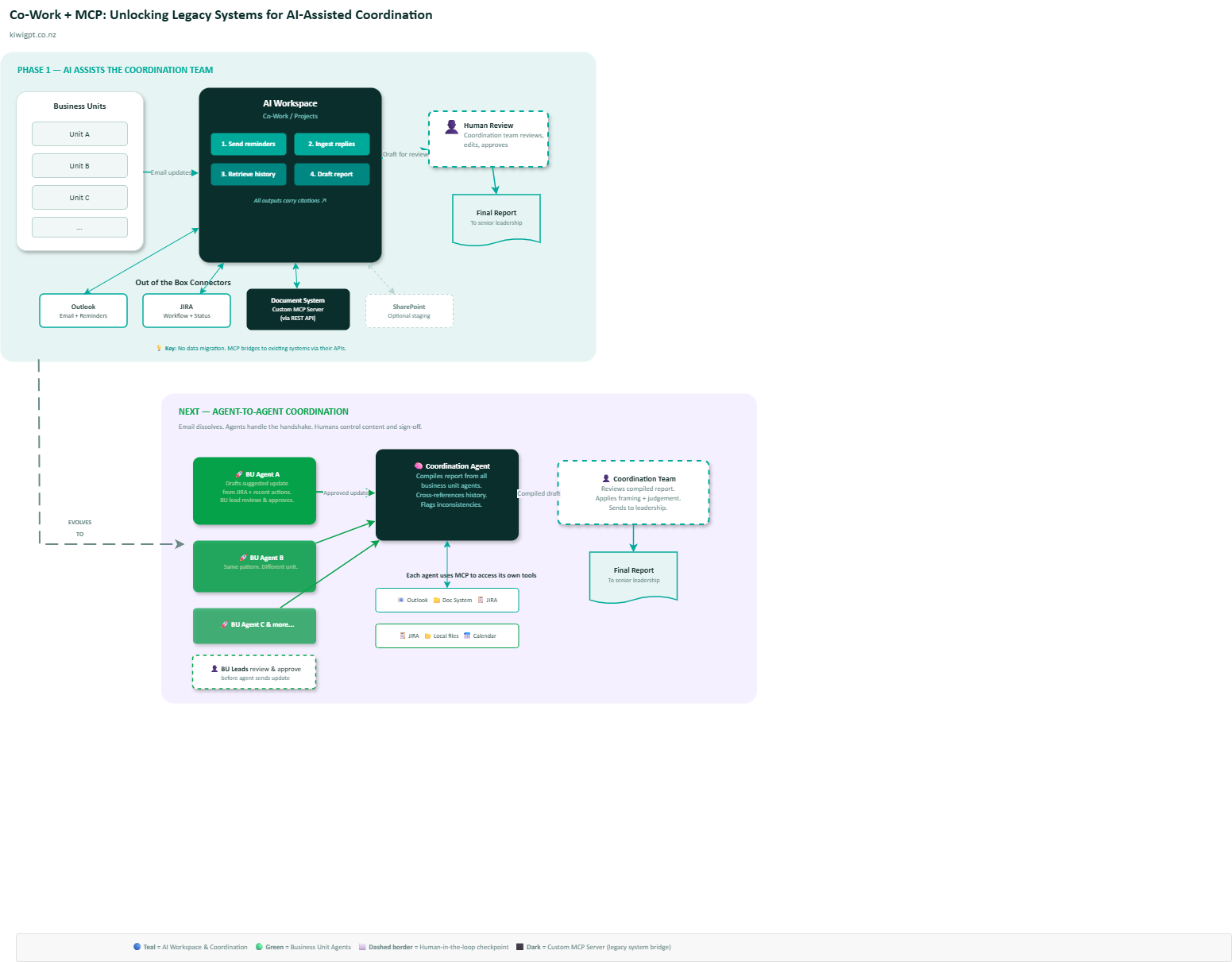 Architecture: Co-Work + MCP bridging legacy systems to AI-assisted coordination, evolving toward agent-to-agent handshake. (draw.io source)
The Key Unlock: Your Legacy System
This is the part that most people miss.
The strategic value is not the email automation. It’s not even the draft generation. It’s transforming a passive document store into an active knowledge asset.
Most document management systems were built for compliance: store documents, apply retention policies, make them retrievable in an audit. They were never designed to answer questions like “what did we tell the minister about this topic six months ago?” or “which business unit last reported on this issue and what was the outcome?”
A custom MCP server, sitting between your AI workspace and your document management system’s API, changes the game. It enables semantic search, contextual retrieval, and cross-referencing that the original system was never designed to do.
And here’s the important nuance: you don’t need to migrate data. You don’t need to copy documents into SharePoint or a new platform. The MCP server talks to your existing system through its existing APIs. The data stays where it is. The intelligence layer sits on top.
What About Copilot?
Fair question. Microsoft Copilot is deeply integrated with the M365 ecosystem. If your documents live in SharePoint, Copilot can work with them natively.
But in many organisations — especially government agencies — the authoritative records are not in SharePoint. They’re in a dedicated records management system. Moving them into SharePoint just so Copilot can see them creates duplication, governance headaches, and ongoing synchronisation costs.
The MCP approach avoids this entirely. Meet your data where it lives.
Microsoft is also bringing Co-Work-style capabilities to Copilot. When that arrives, the same MCP pattern applies. The protocol is model-agnostic and vendor-agnostic. What you build today with Claude’s Co-Work or Projects will translate when Copilot supports it.
Build on the protocol, not the product.
The Next Step: Agent-to-Agent
Here’s where it gets interesting.
In the pattern I described above, AI assists the coordination team. The business units are still sending emails. Humans at the edges are doing manual work.
Now imagine each business unit has its own AI agent. The agent knows what happened in the last reporting cycle. It can look at the unit’s recent JIRA tickets, completed deliverables, and flagged risks. At the start of a new cycle, the agent drafts a suggested update and presents it to the business unit lead.
The lead reviews it. Edits it. Approves it.
No email from the coordination team. No chasing. The agents handle the handshake.
The coordination team’s agent receives approved updates from each business unit’s agent. It compiles the full report. It cross-references against prior cycles. It flags anything that looks inconsistent.
The coordination team still reviews and signs off. But the grunt work — the searching, the chasing, the comparing — has dissolved.
Coordination Agent  <---->  Business Unit Agent A
                    <---->  Business Unit Agent B
                    <---->  Business Unit Agent C
                    <---->  ...
Each agent talks to its own set of tools through MCP. The coordination agent talks to the document management system and the email system. Each business unit agent talks to JIRA, their local files, their calendar. The agents talk to each other through a shared protocol.
Humans stay in the loop at every approval point. The AI drafts. Humans decide.
What You Need to Get Started
This is not a three-year transformation programme. Here’s a practical starting point:
Confirm API access to your document management system. If it has REST APIs — even read-only — you can build an MCP server against them. If it doesn’t, that’s your first conversation with the vendor.
Start small. Pick one recurring report. One coordination team. One cycle. Run a time-bound trial and measure: how much time does the AI save? How accurate are the drafts? How many corrections does the human team need to make?
Define success criteria before you start, not after. Time saved, accuracy, and user satisfaction are the three that matter most.
Don’t migrate data. Build the MCP bridge to your existing system. Avoid the temptation to copy everything into a new platform just because the AI tool you chose works best with that platform. That’s a trap.
Wrapping Up
The most valuable knowledge in your organisation is probably sitting in a system that nobody loves but everybody depends on. A document vault. A records platform. A compliance tool that’s been quietly accumulating institutional memory for a decade.
AI can’t help you if it can’t see that knowledge.
Co-Work gives you the orchestration. MCP gives you the connection. Together, they let AI reach into those legacy systems — without moving data, without migration projects, without governance nightmares.
Start with the report nobody wants to compile. The one that takes three days and should take three hours.
That’s your pilot.
This post is part of a series on MCP and enterprise AI. See also:
- What Is MCP? The AI Protocol Bridging Models and Tools
- Where the MCP Channel Fits: Humans, Digital Systems, and AI
- From APIs to AI Channels: The Next Evolution
Written for KiwiGPT.co.nz — Generated, Published and Tinkered with AI by a Kiwi